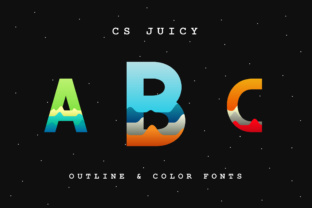
CS Juicy Outline: A Bold Display Font
There I was, staring at a blank brand board, trying to find the right visual voice for a new boutique coffee shop. The client wanted something modern but with a playful edge. That’s when I pulled out CS Juicy Outline and let it do the talking.
A Visual Statement
CS Juicy Outline is an opentype SVG font that leans into boldness and vibrancy. Its outline style gives it a dynamic look, as if the letters are slightly lifted from the page. The diversity of colors in the font isn’t just about aesthetics—it adds a layer of personality that can make a brand stand out. It’s not for every project, but when used right, it brings energy and a sense of movement to any design.
The font has a modern feel, with clean lines and subtle curves that balance between sharp and soft. It’s not too ornate, which makes it versatile for display purposes. Whether you’re designing a logo or a social media header, CS Juicy Outline offers a fresh take on what a display font can be.
Real-World Testing
I tested CS Juicy Outline across several branding elements. On a logo concept, it added a sense of playfulness without being too flashy. When paired with a simple sans serif for the tagline, it created a nice contrast that felt both professional and approachable.
On packaging mockups, the font worked well for product names and slogans. It had enough weight to be readable at larger sizes, but I noticed that it didn’t fare as well in smaller text. For example, on a business card, the details got lost, making it hard to read at a glance. That’s a key consideration when using it in more practical design assets.
In web design, I used it for a homepage hero section. The font caught attention immediately, but I had to limit its use to short phrases. Long paragraphs in this font would be tough on the eyes, especially on mobile devices.
When to Use It
CS Juicy Outline excels as a headline or logo font. It’s ideal for projects that need a strong visual identity, like a café rebrand or a skincare product line. Its bold outlines and color diversity make it perfect for creating a memorable brand presence.
It also works well in social media graphics, where visual impact is key. On Instagram posts or Facebook banners, the font adds a pop of personality that can help content stand out in a crowded feed.
However, it’s not the best choice for body text or formal corporate branding. The font’s style is too distinctive for long passages of text, and its readability at small sizes is limited. If you're working on a website or printed document with extended text, you’ll want to pair it with a more traditional typeface.
Pairing and Practical Tips
When pairing CS Juicy Outline with other fonts, think about balance. A simple serif or sans serif can complement its boldness without clashing. For example, pairing it with a classic serif font like Georgia or a modern sans like Helvetica Neue creates a clean, professional look that still feels creative.
If you’re working on a project that requires multilingual support, check the font’s character set. While CS Juicy Outline likely includes most common characters, it’s always good to verify before finalizing a design for international audiences.
Before using the font in client work, test it thoroughly. Create a few different versions of your design—on screen, on print, and at various sizes. This helps ensure that the font performs as expected in real-world scenarios.
Final Thoughts
CS Juicy Outline is a standout display font that brings a unique blend of modernity and color diversity to any design. It’s not a one-size-fits-all solution, but when used intentionally, it can elevate a brand’s visual identity in a meaningful way.
As with any premium font, make sure to review the licensing terms before using it in commercial projects. Understanding the scope of use ensures that you’re compliant and avoids any potential issues down the line.